Satellite-to-Mobile Safety for Field Teams in 2026: How to Stay Connected Beyond Mobile Coverage

Week 3 of National Safe Work Month in Australia is about the future: the long-term impact of workplace harm, and what we can do now to prevent it. For remote workers, one of the biggest gaps is coverage. When someone moves in and out of range of a mobile tower, a delay in anyone knowing they need help can matter. This post covers what happens when a remote worker loses signal, how satellite-to-mobile works, and how to choose the right approach for your team.
Key takeaways
Safe Work Australia lists unreliable or limited communications, such as workplaces with no phone reception, as part of what makes work remote or isolated.
Businesses must manage the risks of remote or isolated work, including providing effective communication with the workers involved.
Satellite-to-mobile lets a standard smartphone send critical safety messages via satellite, with no extra hardware.
It's designed for remote workers whose coverage comes and goes, not for lone workers who are usually in range.
The best approach is layered: combine connectivity types so critical safety events still get through.
Why does mobile coverage matter for remote worker safety?
Safety systems depend on communication: a check-in, a location update, an alert. When a remote worker moves outside coverage, that link can break and nobody may know help is needed. Safe Work Australia says businesses must manage the risks of remote or isolated work, including providing effective communication.
Safe Work Australia describes remote or isolated work as work cut off from the help of others because of its location, time or nature. It's more than losing reception in the lift, and it includes workplaces with no phone reception or unreliable communications.
This week's theme is "For the future: the long-term impact". Safe Work Australia's guidance notes that the longer, more often and more severe the isolation, the higher the risk of harm. For teams that regularly lose signal, that's a gap to plan for now, not after an incident.
What is satellite-to-mobile?
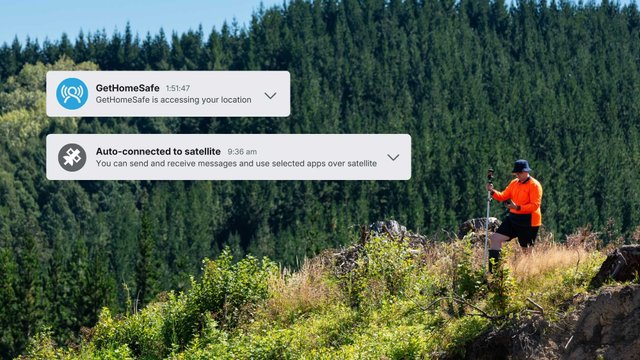
Satellite-to-mobile (also called direct-to-cell) lets a standard smartphone send critical safety messages via satellite when there's no mobile coverage, without needing a separate satellite device.
GetHomeSafe works with satellite-to-mobile services from supported mobile providers, powered by Starlink’s satellite-to-mobile technology and lightweight satellite data. Out of coverage, key actions can be sent from the app via satellite, with automatic fallback to SMS: OK/welfare check-ins, Quick-Start, Extend Timer, finishing an activity (HomeSafe), and help and emergency alerts. Availability depends on your device, plan and network.
- One NZ compatibility
- Spark NZ compatibility
- If you're outside New Zealand, your carrier's website will list which of their plans and devices currently support satellite connectivity.
It isn't about replacing other connectivity. It's a layer that helps make sure critical safety events still get through.
Who is satellite-to-mobile for?
Satellite-to-mobile is designed for remote workers who move in and out of mobile coverage, such as field teams, rural and forestry crews, and workers travelling long distances between sites. Lone workers who are usually in coverage are generally well served by standard app-based check-ins over mobile data.
It suits teams where coverage gaps are frequent but not constant, because workers don't have to think about which connection to use. For workers who spend long periods with no coverage at all, a dedicated satellite communicator may still be the better fit. See the options table below.
The benefits for remote teams:
- No extra hardware: no separate device to carry, charge or forget, and no additional data plan.
- Better adoption: if workers don't have to think about coverage, they're far more likely to use the system every time.
- Stronger duty of care: you can show safety monitoring beyond standard cell tower coverage.
What happens when a remote worker has no mobile coverage?
Without a fallback, check-ins and alerts can’t be sent, and nobody may know a worker is in trouble until their timer runs out. Overdue alerts will still trigger, because the timer is set when the activity starts and counts down on both the app and the backend. But that’s a safety net, not a way to get help right now.
With satellite-to-mobile and SMS fallback, a worker can raise a help or emergency alert the moment something goes wrong, even with no mobile coverage or data connection. Check-ins, Quick-Start, Extend Timer and finishing an activity can also get through in the gaps.
Requirements
- GetHomeSafe app version 4.27 or above.
- For SMS fallback, the worker’s mobile number must be associated with their GetHomeSafe profile.
How does satellite messaging protect remote workers?
Satellite messaging protects remote workers by keeping a communication channel open where mobile coverage doesn't reach, so check-ins, location updates and alerts still arrive at the platform and reach the people responsible for their safety.
Option | How it works | Best for |
Satellite-to-mobile | Everyday smartphone sends safety messages via satellite, with SMS fallback | Remote workers who move in and out of coverage and want no extra hardware; availability depends on network and device |
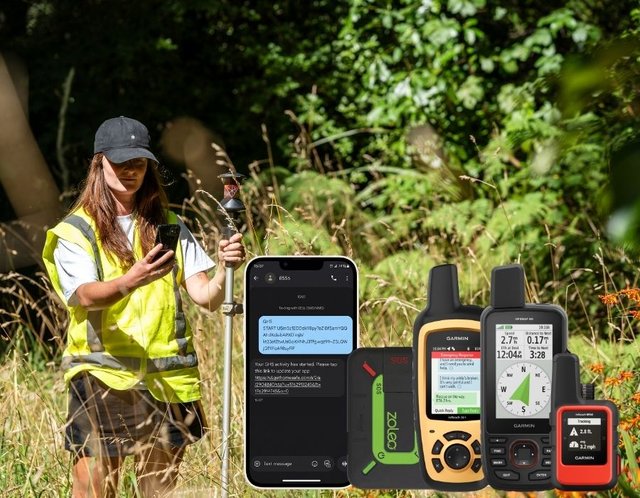
Satellite communicators (Garmin, inReach, ZOLEO, SPOT) | Dedicated device connects to satellite networks and integrates with GetHomeSafe | Workers who spend long periods with no coverage or who want a dedicated device |
GetHomeSafe supports over 20 compatible lone worker devices and multiple satellite network options, so teams can choose what suits their environment.
How do you choose the right satellite option for your team?
Choose based on where your people work, how often they're out of coverage, and how much hardware you want them to carry. Then test the setup before you rely on it.
- Where are your coverage gaps? Map the areas your teams actually visit, not just the ones on the coverage map.
- How often do workers go out of coverage? Frequent short gaps often suit satellite-to-mobile, while long periods with no coverage may call for a dedicated communicator.
- What will people actually use? The best system is the one workers carry and use every time.
- What happens if a check-in is missed? Confirm who is alerted, how quickly, and how.
- Have you tested it in the field? See How to Test Satellite-to-Mobile Safety Coverage with GetHomeSafe
Safe Work Australia's guidance points to communication systems, buddy systems and movement records as ways to control remote work risks. Check-ins, journey tracking and escalation when a check-in is missed support the same goals, wherever your people are.
What can you do during Safe Work Month?
Three quick actions for remote teams: map your coverage gaps, test what happens when a worker goes out of range, and check that your escalation process works without a phone signal.
- Map your gaps. List the sites and routes where coverage drops out.
- Run a test. Ask a team member to go out of range and see how quickly the right people find out.
- Review your process. Confirm your missed check-in and escalation steps don't rely on a signal.
Not sure where to start? Our free 2026 Remote Worker Safety Checklist walks through the common blind spots for lone and remote teams.
Frequently asked questions
Satellite-to-mobile lets a standard smartphone send critical safety messages via satellite when there's no mobile network, without a separate satellite device.
It's designed for remote workers who move in and out of mobile coverage, such as field teams and rural crews. Lone workers who are usually in coverage are generally well served by standard app-based check-ins.
Yes, if the platform is built for it. GetHomeSafe's overdue alert works even with no data connection, and satellite options let check-ins and alerts get through in areas with no coverage.
Not always. Satellite-to-mobile can work on a standard smartphone where it's available. Workers who spend long periods with no coverage may still choose a dedicated satellite communicator such as a Garmin inReach, ZOLEO or SPOT.
Take the next step
Want to find the coverage blind spots in your remote worker safety? Explore satellite-to-mobile, download the free 2026 Remote Worker Safety Checklist, or book a demo.
Source: Safe Work Australia, Remote or isolated work and National Safe Work Month. This article is general information only and isn't legal or compliance advice.
Coming up next week: Best remote safety software for field teams in Australia
Related reading: National Safe Work Month 2026: What It Is and Why It Matters |Q&A with Cat: What Community Health Work Taught Her About Lone Worker Safety | How to Test Satellite-to-Mobile Safety Coverage with GetHomeSafe | Why SMS Fallback Is Changing the Game for Remote Worker Safety
Last updated: 19th October 2026