Multiple Sites is now live: monitor a whole day of site visits in one activity
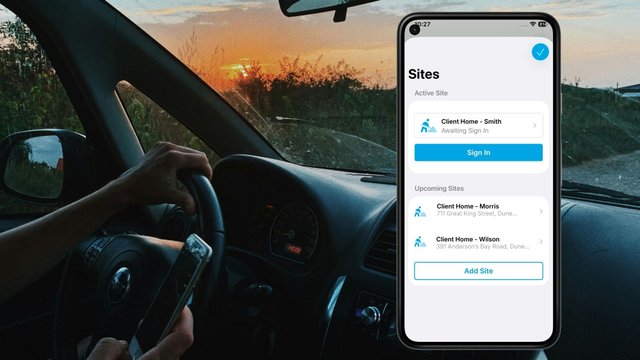

Multiple Sites is a GetHomeSafe feature that lets lone and field workers plan every site visit in a single activity. Workers sign in on arrival and sign out on departure, and each site’s contacts are alerted only while the worker is there. It has now moved out of beta and is available to organisations with the Fieldworker and Journey & Planning add-ons.
Since we launched Multiple Sites in beta, field teams have told us what matters most: fewer taps, no monitoring gaps, the right people alerted at the right stop, and the freedom to change the plan as the day unfolds. Workers can add or remove sites mid-activity as jobs come in or drop off, without stopping their tracking. Here’s how it works.
What are Multiple Sites?
Multiple Sites lets workers plan a full day of site visits in one activity. They add every site they’ll visit, in order, instead of starting a new activity at each stop.
- One combined planner. The Journey and Sites fields are now a single Journey & Sites planner.
- Registered sites are recognised. Any waypoint that matches a registered site is attached as that site automatically.
How does Multiple Sites work on the day?
- Sign in on arrival. The site’s contacts start receiving alerts for that worker.
- Sign out on departure. Site contacts stop receiving alerts straight away, and the worker picks their next site.
- Adjust as the day changes. Workers can add or remove sites mid-activity, change which site they’re heading to next, view a site’s details and contacts, and add or remove site contacts. See more below.
- Track progress. Completed sites move to the bottom of the list, so the next stop is always at the top.

Can workers add or remove sites during an activity?
Yes. Plans change, and workers don’t need to end their activity to reflect that. While tracking is running, they can:
- Add a site as soon as a new job comes in, a visit is added to their round, or a detour is needed
- Remove a site they haven’t visited yet if a visit is cancelled, rescheduled or no longer needed
- Change which site they’re heading to next, so team leaders can see the updated destination
- View a site’s details and contacts before arriving
- Add or remove site contacts for that visit
The activity keeps running the whole time, so monitoring is never interrupted by a change of plan. Sites already visited stay on record and move to the bottom of the list, and the next stop stays at the top.

What are the benefits of monitoring multiple site visits in one activity?
- Flexibility without restarting. Add or remove sites mid-activity as work changes, while staying covered by the same continuous activity.
- Less admin for workers. One activity for the whole trip, rather than starting, finishing and restarting at every stop.
- No gaps in monitoring. Workers stay covered by one continuous activity as they move between sites, with no risk of forgetting to start the next one.
- The right people alerted. If something goes wrong at a site, the people responsible for that site are alerted along with the worker’s team leaders. Once the worker leaves, those contacts are no longer alerted.
- Clearer records. Each site visit is captured within the activity, showing where the worker went and in what order.
Who is Multiple Sites for?
Any team covering several locations in a day, including:
- Healthcare and community workers doing home visits. See how we support healthcare and community teams.
- Field technicians and maintenance staff covering several sites a day, often with jobs added or cancelled along the way.
- Inspectors, assessors and property managers on scheduled rounds.
Multiple Sites builds on our journey management and lone worker safety capabilities.
Is Multiple Sites available on my plan?
Multiple Sites is available to organisations with both the Fieldworker and Journey & Planning add-ons. Don’t have both? Talk to your account manager about adding them.
Frequently asked questions
Multiple Sites lets workers plan and run a full day of site visits in one activity, rather than starting a new activity at each stop.
When a worker signs in at a site, that site’s contacts receive alerts for them, along with the worker’s team leaders.
Site contacts stop receiving alerts as soon as the worker signs out of the site.
Yes. Workers can add new sites and remove sites they haven’t visited yet at any point during an activity, without stopping or restarting it. They can also change which site they’re heading to next.
You need both the Fieldworker and Journey & Planning add-ons. Contact your account manager to add them.
Run a full day of travel and site work in one activity, with better visibility and fewer admin tasks.
Ready to simplify multi-stop field operations?
Run a full day of travel and site work in one activity, with better visibility and fewer admin tasks.
Last Updated: 20th October 2026