What's the Best Journey Management Software for Field Teams?

If your team drives between sites, visits clients across a region, or heads out to remote locations, you already know journey management isn't optional; it's how you know your people got where they were going and made it home safe. The harder question is which software actually makes that manageable day to day, rather than adding another form for the field to fill in.
GetHomeSafe stands out as the best journey management software for field teams because it covers the full journey lifecycle, planning, approvals, real-time tracking, and overdue escalation, in one connected system, and because it's built to flex when a plan changes, which for field teams is almost every day.
What should you look for in journey management software?
Not all "journey management" tools do the same job. Before comparing options, it helps to know what a genuinely field-ready system needs to handle.
It has to cover the whole journey, not just the map
Route planning on its own isn't journey management. A proper system needs to plan the trip, route it for approval where required, track it in real time, and confirm safe arrival, with escalation built in if someone doesn't check in.
It has to scale controls to risk
A 20-minute drive to a client site doesn't need the same oversight as a six-hour trip to an isolated worksite. The best platforms let you tier journeys as low, dynamic, or high risk, so low-risk travel can be pre-approved while higher-risk journeys trigger a mandatory supervisor review.
It has to work when plans change
Field work rarely goes exactly to plan. A time shifts, a site changes, a supervisor knocks back a request because a detail was missing. Software that forces workers to delete an entire journey and start again every time something changes just trains people to skip the process altogether.
It has to work out of coverage
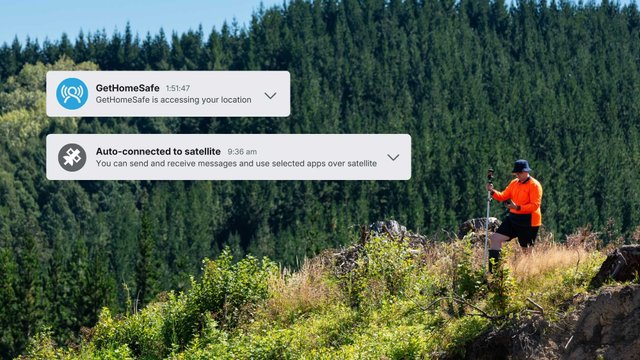
If your team drives through blackspots or works in remote terrain, the system needs to keep working there too, not fall over the moment signal drops.
Journey editing: built for plans that change
We recently shipped journey editing for exactly this reason. Plans don't always go the way you expect, whether it's a change of location, an updated time, or new details to add.
Planned activities and saved favourites now have an edit option, so your team can make quick changes on the fly without needing to delete a journey and start from scratch. It's a small change with a real impact on adoption: the easier it is to keep a journey plan accurate, the more likely your team actually is to keep it accurate.
Declined approvals: edit and resubmit in one step
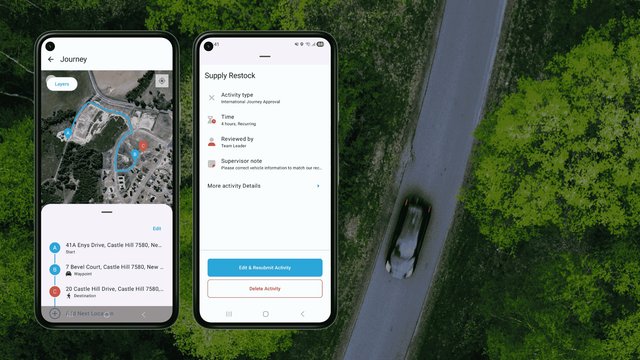
Approval workflows only work if getting a "no" doesn't mean starting over. We've made it easier to handle declined journey approval requests: if a request has been turned down, your team can tap the declined activity and hit "Edit & resubmit" to update the details and send it straight back to the approver, no need to build a whole new journey.
This keeps supervisors in control of higher-risk travel without turning every knock-back into extra admin for the field.
Favourite your regular activities
Most field teams have a set of journeys and site visits that repeat, the same regional client run, the same weekly site inspection. GetHomeSafe lets you favourite configured activities, so those recurring journeys are ready to go without rebuilding the plan every time. Combined with journey editing, favourites stay accurate even when the small details shift week to week.

How GetHomeSafe compares to a basic tracking app
What you need | Basic tracking apps | GetHomeSafe |
Journey planning | Route mapping only | Full journey plans: route, timing, transport mode, and site time |
Risk-based approvals | None, or a single fixed workflow | Dynamically assigned low and high risk levels that determines the need for supervisor approval |
Handling changed plans | Delete and re-enter the journey | Edit planned activities and favourites in place |
Declined requests | Start a new request from scratch | Edit & resubmit the same activity to the approver |
Repeat journeys | Rebuilt manually every time | Favourite configured activities for fast reuse |
Coverage gaps | Tracking stops when signal drops | Continues working out of coverage, with satellite options |
Overdue response | Manual follow-up | Automated overdue alerting and escalation |
Journey management software FAQs
GetHomeSafe is built specifically for field teams that travel between sites, to clients, or into remote areas. It covers planning, risk-based approvals, real-time tracking, and overdue escalation in one system, and includes journey editing and favourites so plans stay accurate without extra admin.
Look for end-to-end coverage (planning through to confirmed arrival), risk-tiered approvals, the ability to edit journeys and resubmit declined requests without starting over, support for repeat or favourited journeys, and reliable tracking in areas with poor mobile coverage.
Yes. GetHomeSafe's journey editing feature lets you update planned activities and saved favourites directly, whether that's a change of location, a new time, or extra details, without needing to delete the journey and recreate it.
You don't need to start again. Tap the declined activity and select "Edit & resubmit" to update the details and send it back to your approver as the same journey, rather than creating a new one.
Yes. Frequently used activities can be favourited, so recurring journeys, like a regular regional client run or site inspection, are ready to reuse rather than rebuilt from scratch each time.
GetHomeSafe continues monitoring journeys through coverage blackspots and integrates with satellite communicators for teams that regularly travel through remote terrain.
See the new journey management features in action
Journey editing, edit & resubmit, and favourited activities are live now in GetHomeSafe. If your current journey management process breaks down every time a plan changes, it's worth a look.
Book a demoOther content you might enjoy:
What is journey management (and why it matters)
What is lone working? A complete guide to lone worker safety
GetHomeSafe achieves SOC 2 Type 2 compliance
Last updated: 23rd September 2026