Keeping staff safe on after-hours home visits in Brisbane
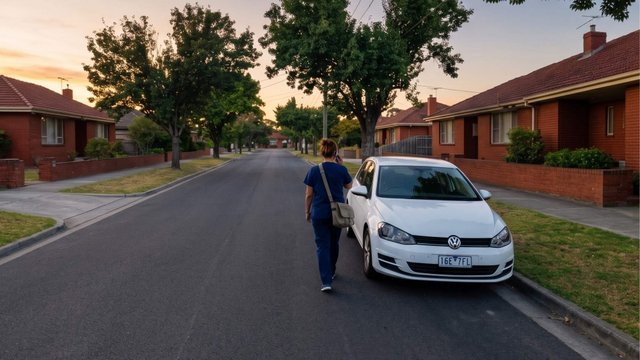

It’s 7:40pm on a Tuesday evening. A community nurse is running forty minutes behind because her 5pm visit in Redbank Plains took longer than the roster allowed. Her last client of the day is in an outer suburb she’s been to twice. The client’s son is home tonight, which wasn’t the case last visit, and he’s been drinking. Her phone shows one bar in the hallway and nothing in the back bedroom.
Nobody at the office is watching. The on-call coordinator finished at six. The next person expecting to hear from her is her partner, at home, who assumes she’s running late again.
Nothing happens. It almost never does. But the reason nothing happened has nothing to do with any system her employer put in place, and that’s the part worth fixing.
The safety process nobody’s using
Most providers we talk to already have something. That's rarely the problem.
The problem is usually that devices or solutions aren’t being used. A drawer of GPS duress dongles that staff stopped carrying because they’re awkward to reach for mid-visit, need charging, and mark you out as somebody who expects trouble. Some teams make do with Find My iPhone and a Teams message. Or simply a whiteboard by reception that says, “Text me when you’re done.”
None of that is negligence. It’s what happens when the available options are either too intrusive for client-facing work or too manual to survive a full roster. Staff aren’t refusing to be safe. They’re refusing to add one more process to a visit where they’re already managing medication, a care plan, a family member, and a running clock.
Any system that doesn’t start from that reality will end up in the drawer with the last one.
Why after-hours is the sharp end
Three things change after five o’clock. Offices empty, so escalation often narrows to a single phone. Rosters compress, so visits run late and people stop flagging it because being behind is normal. And visibility drops, because a worker who’s overdue at 8pm looks exactly like a worker who’s taking extra time to talk to a client.
The frequency rate of assault claims in nursing, care and support work is approximately 6.5 times higher than across all other occupations.
This covers the whole nursing, care and support workforce, not aged care alone. Source: Safe Work Australia.
The underlying risk is well documented. Safe Work Australia's data also shows health care and social assistance workers face higher rates of workplace aggression, with angry or hostile behaviour, shouting and swearing, and intimidation and insults the most commonly reported behaviours. Serious mental health claims among nursing, care and support workers have almost doubled in the past decade.
Greater Brisbane adds its own complication. Providers covering Logan, Ipswich, Moreton Bay and the Redlands need to send staff on long drives between clients, into apartment buildings with no-coverage basements and stairwells, and out along semi-rural roads where coverage depends on which carrier the worker happens to be with. The federal Peri-Urban Mobile Program exists precisely because the urban fringe is less well served than the coverage maps suggest. A safety plan that assumes a working signal assumes something outer Brisbane doesn't reliably provide.
The gaps that show up in almost every roster review
Nobody knows the visit ran over. The roster says 30 minutes, the visit takes 55, and there’s no mechanism that notices. Lateness carries no signal at all.
There’s no safe way to raise an alarm. A worker who feels a situation turning can’t always pull out a phone in front of an agitated family member. Doing so escalates the exact thing she’s trying to settle. So she manages it alone, and it often doesn’t turn up in an incident log.
Whoever responds doesn’t have the context. The alert gives a name and maybe a location. Any history of aggression at that address, or the dog, the son who’s sometimes there, the 200m driveway, all of that sits in a care note or somebody’s memory.
Coverage ends at the worst moment. Inside the house, in the basement carpark, at the far end of a property. The safety plan often falls through because it depends on a signal at the wrong time.
What better looks like
These are controls you layer onto visits you’re already running. None of them require a new rostering system or a change to clinical processes.
Start with whether anyone will actually use it
This is the first question worth asking of any option, because every other feature is theoretical if the thing sits in a drawer.
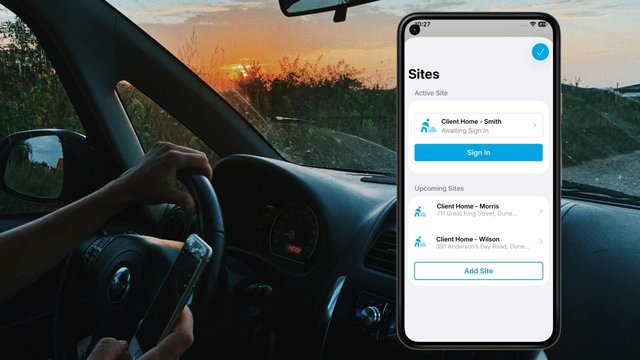
Two design choices decide it. The first is running on the phone staff already carry, so there's no second device to charge, remember or explain to a client. The second is escalation-only monitoring. By default the system watches the timer and only escalates when something’s wrong. Reminders are configurable, so you can set them to suit the visit rather than nagging staff every twenty minutes. No check-in prompts every twenty minutes, no dashboard for a coordinator to stare at, no stream of false alarms that trains everyone to ignore it.
A worker starts an activity when she arrives and closes it when she leaves. If the visit runs long, she extends it in a couple of taps, which also gives you the data on which visits routinely overrun.
Give people a way to ask for help without reaching for a phone
Community and clinical work is complex, and if there’s a risk, visibly calling for help can make it worse, so panic buttons on a screen often don’t get pressed.
A Flic button clipped inside a pocket, on a lanyard or worn on a wearable watch strap, gives a physical, concealable trigger. No unlocking, no screen, no visible action. Paired with the app while an activity is running, A press-and-hold on a paired Flic button raises a panic alert to your supervisors. This is the single control staff in this sector ask for most often, and it’s the clearest gap in most app-based alternatives.
Work out who’s on call after hours
Plenty of providers run after-hours escalation through a team leader’s personal mobile. No roster, no allowance, just an understanding that they’ll pick up. That’s always fragile. And since the right to disconnect took effect, it’s also on shaky ground.
Section 333M of the Fair Work Act lets employees refuse to monitor, read or respond to work contact outside their working hours unless that refusal is unreasonable. It has applied to employers with 15 or more staff since August 2024 and to everyone else since August 2025. Reasonableness weighs several things, including why the contact was made and whether the employee is paid for being available. An at-risk worker at a client’s address is about as reasonable a basis for contact as exists, but that’s an argument you’d make after something went wrong. It isn’t a design.
The design is a responder who is rostered, paid and expecting the call. Most awards already assume this. SCHADS carries an on-call allowance, a minimum payment for recall to work, and provisions covering remote response, and other health awards have on-call allowances of their own. Check the one that covers your staff.
Two ways to build it, and many providers use both:
Internal responders. Set your own team leaders as alert receivers, with up to three escalation steps and separate after-hours settings, so a missed call doesn’t end the chain. Internal responders know the clients, the addresses and the roads, which is often worth more than raw speed.
Professional monitoring. Hand the after-hours window to a 24/7 monitoring centre that takes the alert, assesses it and escalates to emergency services or your nominated contacts. This can be your own call centre (Enterprise) or a monitoring provider you choose.
GetHomeSafe works either way. A missed check-in or silent alert escalates automatically to your own team leaders, to your monitoring arrangement, or both.
Location while someone’s working, not location always
Staff are wary of being tracked, with reason, and this objection sinks more rollouts than any feature gap.
The distinction that settles it: location is shared only while a worker has actively started a work activity, and it’s available to responders if something goes wrong. Not between visits while on break. Not on a day off. Not as a feed for a manager to browse. We recommend making that clear in the rollout, put it in writing, and let staff see what a manager can and can’t see: objections are almost never to the safety function. They’re to the assumption that they’re being watched the rest of the time.
Cover the drive, not just the doorstep
For teams working out through Logan, Ipswich and Moreton Bay, a meaningful share of the risk sits in transit. Long drives between clients, unfamiliar roads, fatigue at the end of a shift, weather. Most lone worker tools only monitor at the destination.
Journey management planning covers the gap. A worker plans the route and the stops, requests approval before leaving, and a supervisor reviews and approves or declines. Tracking runs during travel, and check-in timing adjusts to conditions rather than assuming the drive goes to plan.
Dynamic risk assessment sits at the front of the same process. Configurable question sets by activity type, risk points against the answers, automated warnings, supervisor approval triggered above a threshold, and the ability to block an activity entirely when the score is too high. Prompted at planning or at pre-start, with every answer recorded. For most providers that replaces a paper or spreadsheet risk assessment that lived separately from the actual visit, and it consolidates two processes into one.
Risk Levels
As users answer risk assessment questions, they will accumulate risk points.
Maximum available risk points: 50
Assume coverage fails, because it will
In the outer ring, plan for the signal going. If a worker misses a check-in, the server, not their phone, sends the alert to your nominated contacts, and overdue workers automatically trigger notifications to supervisors. The safety net isn’t made of the same material as the thing that’s failing.
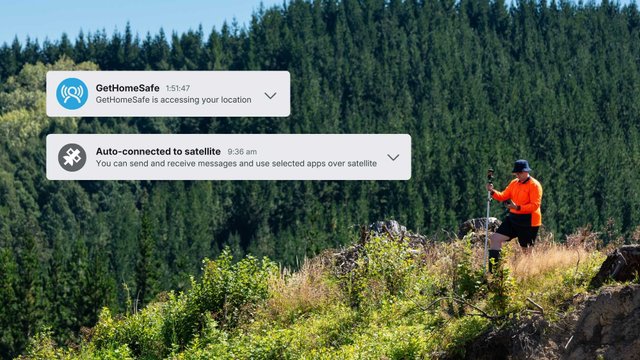
Underneath that: when a worker leaves coverage, the app caches their location and prompts them to find signal, with proactive reminders to check in even when they’re out of coverage. In Australia, satellite-to-mobile through Telstra currently works over SMS, so a worker’s own smartphone can send critical messages, such as check-ins and help alerts, from beyond the mobile network. Lightweight satellite data is coming soon. For genuinely remote clients, GetHomeSafe also works with 20+ compatible devices, including satellite devices, with man-down and impact alerts and two-way SMS on selected devices.
The part that isn’t about safety
Safety systems get judged on what they prevent, which makes them hard to budget for. This one also removes an operational constraint, and that tends to be the argument that gets it approved.
When the check-in and escalation are automated and properly resourced, a coordinator no longer has to stay up until nine waiting for a text confirming someone got home. Outreach workers can stay with a client when the situation calls for it. Satellite clinics can run with a single clinician instead of closing because there’s no safety cover. Evening and weekend rounds get easier to fill.
You can extend service hours without adding a standby shift for every one of them. That’s a service capacity argument, and it’s usually more persuasive to a finance committee than a risk register.
The other thing worth having ready is the evidence trail. Who was working, where, whether they completed the risk assessment, whether they checked in, when the alert fired, who responded and what they did. Those records make the compliance case, and they’re what turns an incident review from a reconstruction into a readout.
Frequently asked questions
At minimum: an automated check-in with a defined timeout, a discreet duress alert that doesn’t require a phone call, a named after-hours responder with an agreed escalation procedure, and location-based hazard information available to both the worker and the responder. Manual text or phone check-ins can meet the duty for low-risk visits, but they depend on someone remembering and they produce no evidence the system exists.
Usually because the tool is impractical during client-facing work. Dedicated dongles and pendants need charging, have to be carried separately, and are conspicuous in a client’s home. Adoption improves when the safety function runs on the phone staff already carry, and when reminders are configurable rather than constant. Staff also need to trust it, so share location only while a work activity is running, be specific about who can see what, show staff the manager’s view rather than describing it, and involve them in setting check-in intervals. In our experience the objection is rarely to the safety function itself. It’s to the assumption of being watched the rest of the time.
Australian WHS legislation uses “remote or isolated work” rather than “lone worker”. Regulation 48 of the Model WHS Regulations defines it as work isolated from the assistance of other persons because of location, time or the nature of the work, where assistance includes rescue, medical help and emergency services attendance. A nurse or support worker alone in a client’s home in suburban Brisbane meets that definition. Queensland’s psychosocial hazards Code of Practice, an approved code under the WHS Act that has applied since 1 April 2023, separately lists remote or isolated work and violence and aggression as psychosocial hazards.
The worker triggers an alert with no visible action, typically using a small Bluetooth button such as a Flic worn on a lanyard or kept in a pocket. Paired with the app, pressing and holding the button raises an alert to your supervisors without the worker having to handle their phone. This matters in community work because the most common risk is an interaction turning hostile while the worker is in the room, where visibly calling for help could escalate the situation.
The right to disconnect affects how you resource escalation, not whether you can do it. Under section 333M of the Fair Work Act, employees can refuse to monitor or respond to work contact outside their working hours unless that refusal is unreasonable, and whether they’re compensated for being available is one factor considered. Contact about an urgent safety situation sits at the strong end of reasonable, but an escalation chain that depends on an unrostered manager answering their personal phone isn’t a reliable control either way. You have two options, and many providers use both:
Internal responders: cheaper and better informed, since they know the client, the address and the road. Set your own team leaders as alert receivers, with up to three escalation steps and separate after-hours settings, so a missed call doesn’t end the chain.
Professional monitoring: more reliable outside business hours, and it removes any expectation that your own staff stay reachable. Alerts can go to your own call centre (Enterprise) or a monitoring provider you choose.
GetHomeSafe supports either model: a missed check-in or silent alert escalates automatically to your own team leaders, your monitoring arrangement, or both.
It depends on where the safety logic runs. If a worker misses a check-in, the server, not their phone, sends the alert to your nominated contacts, and overdue workers automatically trigger notifications to supervisors. When a worker leaves coverage, the app caches their location and prompts them to find signal, with reminders to check in. In Australia, satellite-to-mobile through Telstra currently works over SMS, with lightweight satellite data coming soon. For genuinely remote clients, GetHomeSafe also works with 20+ compatible devices, including satellite devices.
Where to start
Take one week of after-hours visits and mark up three columns. Which visits relied on a worker remembering to call. Which had no discreet way to raise an alarm. Which were at addresses where coverage is unreliable. Anything ticked twice is where your exposure sits.
We’ve built a home visit safety checklist for community and healthcare teams, covering pre-visit risk, arrival and departure, duress and escalation, and what to record afterwards.
Download the home visit safety checklist
Try GetHomeSafe with your own roster
If you manage community or outreach teams across Brisbane, Logan, Ipswich, Moreton Bay or the Redlands, the useful conversation isn’t about features. It’s about your evening rounds, and what would actually happen if somebody needed help.
Book a demo or see how GetHomeSafe is set up for healthcare and community teams.
Last updated: 11th November 2026