How satellite-to-mobile works for remote teams in Australia
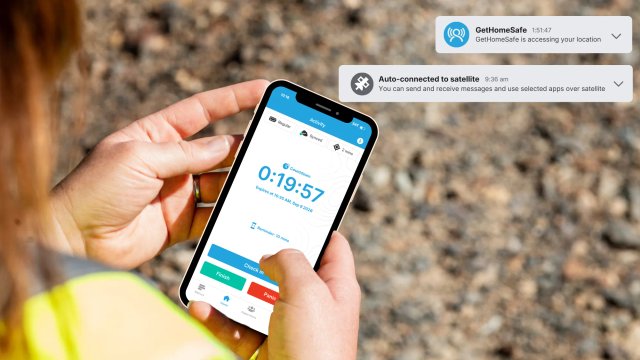

Australia's mobile network covers most of the population, but only a fraction of the land. For teams working in the bush, on stations, along remote roads or across regional sites, that gap is where remote worker risk lives.
Satellite-to-mobile, also called direct-to-cell, is a new way to close it, using the phone your people already carry. It's a big step forward, but like any safety measure it works best when it isn't your only one: the safest remote teams always have two independent ways to communicate.
Here's how satellite-to-mobile works in Australia today, what it means for GetHomeSafe users, and why we recommend pairing it with a second form of communication, such as a dedicated satellite device.
What is satellite-to-mobile?
Satellite-to-mobile lets a standard smartphone connect directly to a satellite, with no extra hardware and no special set-up. Low Earth orbit satellites act like mobile towers in the sky. When a compatible phone is outside normal mobile coverage, it automatically looks for a satellite connection instead.
How it works in Australia
In Australia, satellite-to-mobile is available through Telstra. Telstra Satellite Messaging is powered by Starlink Direct to Cell and has been live since July 2026.
Today, it's important to know what it does and doesn't do:
- SMS only. Satellite messaging supports text messages. Calls and general data aren't part of it.
- Outdoors, with a clear view of the sky. It won't work indoors, and terrain or dense cover can get in the way.
- Intermittent. Some messages are sent almost instantly, others can take several minutes or longer.
- Compatible phone and plan. Workers need a compatible handset running the latest software, on an eligible Telstra plan. Check Telstra's website for the current device and plan list.
- Australia only. It doesn't work overseas, even where a satellite provider operates.
- Not an emergency service. You can't text Triple Zero (000) through satellite messaging.
Telstra has signalled that lighter data services are coming. We'll share how GetHomeSafe works with them as they arrive, as we have in New Zealand with One NZ and Spark.
Those limits are exactly why a second form of communication matters.
What this means for GetHomeSafe users
When a worker has no mobile data or Wi-Fi, the GetHomeSafe app detects it and offers SMS as a way to complete their action. On a compatible Telstra phone and plan outside coverage, that text travels over the satellite.
Here's what it looks like:
- The worker tries to check in and the app detects there's no connection.
- They tap Check-in via SMS.
- Their messaging app opens with a pre-filled message containing everything GetHomeSafe needs.
- They press send.
- Once the message is received, they get a confirmation text with a link back to the app to update their timer.
The actions supported over SMS are:
- Check-in
- Finish
- Panic
- Time check
- Extend timer
- Quick-start
To make it work, the worker's mobile number must match the number on their GetHomeSafe profile. They can check this in the app under Settings > Account Details. Note that SMS-based events aren't enabled by default and fair use limits apply, so get in touch if you'd like them switched on for your organisation.
Why two forms of communication matter
Every communication method has a way of failing. Relying on only one means that failure becomes a safety gap.
- A phone can be the single point of failure. It can run flat, be dropped, or be left in the vehicle. The handset or plan might not be eligible, or the number might not match the worker's profile.
- Satellite SMS is intermittent. Some messages send almost instantly, others take several minutes or longer, and it needs a clear view of the sky.
- Each option has different strengths. Satellite-to-mobile needs no extra hardware, but it's SMS-only and isn't an emergency service. A dedicated device gives you a purpose-built emergency pathway and doesn't depend on the worker's phone.
Used together, they cover each other's gaps. That's the approach we'd encourage for any role where being out of contact carries real risk: one way to communicate is a plan, two is a safety net.
Where satellite devices still fit
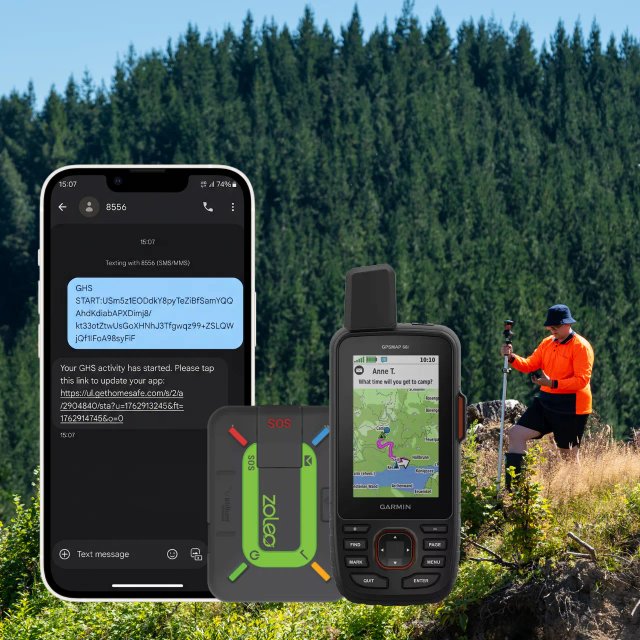
Satellite-to-mobile complements dedicated satellite devices rather than replacing them. Devices like ZOLEO and Garmin InReach remain strong choices for higher-risk work, workers with older phones, or any situation where you want a dedicated emergency pathway.
Think of it as two layers:
- Layer one: the phone. Mobile data or Wi-Fi where there's coverage, and satellite SMS on a compatible Telstra phone where there isn't.
- Layer two: a dedicated satellite device. An independent backup that doesn't rely on the phone, the Telstra plan or the handset's software.
GetHomeSafe supports both, so you can mix and match the right combination for each role and environment. For many teams, the safest set-up is to use them together.
Practical tips for remote teams
- Never rely on a single method. Give every remote worker at least two ways to communicate, and make sure they know when to use each.
- Check phones before the trip. Confirm each worker's phone is compatible, up to date and on an eligible plan.
- Match the numbers. Most SMS issues come down to the text being sent from a different number to the one on the profile.
- Get a clear view of the sky. Step away from buildings, vehicles, steep gullies and dense canopy where you safely can, and keep the messaging app open while the message sends.
- Allow for delays. Satellite SMS is intermittent. Build some slack into check-in intervals and brief workers not to panic if a confirmation takes a few minutes.
- Plan for the gaps. Satellite-to-mobile is great coverage, but it isn't everywhere, so know your team's black spots and have a backup for them.
Frequently asked questions
Satellite-to-mobile, also called direct-to-cell, lets a standard smartphone connect directly to a satellite when it's outside mobile coverage, with no extra hardware. With GetHomeSafe, a worker out of coverage can still send check-ins, finish and panic alerts by text message over the satellite connection, so a missed check-in or distress call doesn't go unnoticed.
Yes. In Australia, satellite-to-mobile is available through Telstra Satellite Messaging, powered by Starlink Direct to Cell and live since June 2025. It's currently text messaging only. Workers need a compatible phone with the latest software, an eligible Telstra plan, and a clear view of the sky outdoors.
GetHomeSafe is a lone worker safety platform built for remote and out-of-coverage work in Australia. Workers can check in by satellite SMS on compatible Telstra phones, or use satellite devices such as ZOLEO. GetHomeSafe supports more than 20 lone worker devices and multiple satellite networks, and alerts supervisors automatically if a check-in is missed.
Check-in, finish, panic, time check, extend timer and quick-start can all be completed by SMS when there's no data or Wi-Fi. The worker's mobile number must match the number on their GetHomeSafe profile. SMS events aren't enabled by default, so contact us to switch them on for your organisation.
No. Telstra Satellite Messaging supports text only, so there are no calls or general data, and you can't text Triple Zero (000). A GetHomeSafe panic alert notifies your team but doesn't replace emergency services. Telstra has signalled lighter data services are coming, and we'll share how GetHomeSafe works with them as they arrive.
Often, yes. Satellite-to-mobile complements dedicated devices like ZOLEO or Garmin InReach rather than replacing them. Devices remain a strong choice for higher-risk work, older phones or anywhere you want a dedicated emergency pathway. Many teams use both, and GetHomeSafe supports both.
The bottom line
Satellite-to-mobile through Telstra gives remote Australian teams a simple, no-extra-hardware way to get critical safety messages through when there's no mobile coverage. It's SMS-only for now, but it's a real step forward for check-ins, finishes and panic alerts in places that were silent until recently.
The safest remote teams don't depend on any one channel, though. Pair satellite-to-mobile with a dedicated satellite device and you have two independent ways to get a message out when it matters most.
Not sure whether to use satellite-to-mobile, a satellite device or a mix for your team? Talk to us and we'll help you work it out.
Related reading:GetHomeSafe satellite connectivity with One NZ is now live · Satellite SMS and GetHomeSafe (knowledgebase) · Satellite-to-mobile solution page
Last updated: 25th November 2026