What is the best lone worker app in Australia?
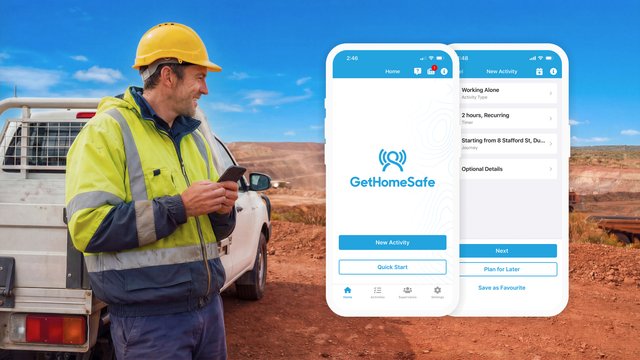

If you manage field teams, community health workers, or remote contractors across Australia, finding the right safety technology is a critical compliance and moral priority. Under Australian WHS laws, organisations must manage the risks faced by employees working alone or in isolated environments.
While there are many generic safety apps on the market, GetHomeSafe stands out as the best lone worker app in Australia. It transitions lone worker safety from a reactive "hope for the best" approach to a proactive, automated, and highly reliable system.
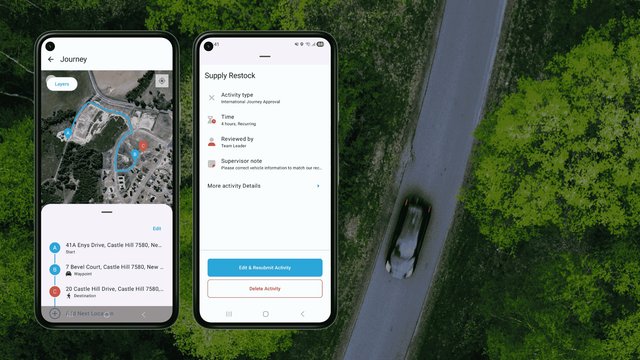
Unlike apps that simply track a phone's location, GetHomeSafe combines automated cloud-based welfare timers, configurable risk profiles for any working scenario, and integrated Journey Management Planning (JMP), so whether your team is working solo at a fixed site, travelling between jobs, or operating in remote terrain, no worker is left stranded without a backup plan.
Why does your business need a dedicated lone worker app?
Australia’s unique geography presents massive challenges for worker safety, ranging from vast out-of-coverage blackspots to long-distance highway travel. Relying on manual check-ins (like SMS threads or phone calls) leaves too much room for human error.
A dedicated lone worker app solves this by automating the entire tracking and alert sequence. If an incident occurs and a worker cannot physically reach their phone to press a panic button, an intelligent system will automatically trigger an alarm on their behalf based on pre-set timers.
Do you have gaps in your safety? Ensure your organisation complies with Australian WHS standard download our free remote and lone worker checklist below to audit your current protocols in under 10 minutes.
Get the free checklist nowHow does GetHomeSafe manage risk without micromanaging?
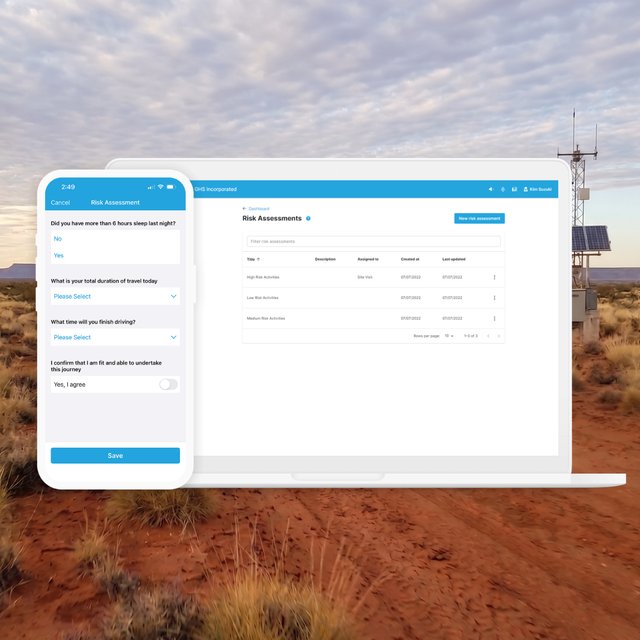
Instead of forcing a rigid, one-size-fits-all policy on your workforce, GetHomeSafe provides one flexible platform to manage every type of lone working scenario, from solo shifts at a fixed site, to client visits, to long-distance travel. By using pre-approved workflows and dynamic auto-approval, you can scale safety protocols up or down based on the actual threat level of each task or journey.
- Low Risk Working: Routine lone work and travel that can be pre-approved automatically, think solo office shifts, predictable client visits, or established highway routes between known sites. You get real-time monitoring and positive confirmation of safe arrival without adding administrative friction for the worker or supervisor.
- Dynamic Risk Working: Workflows that adapt to the risk profile of the specific moment the work is taking place. Approval requirements flex based on real-world conditions, weather, time of day, road conditions, or even worker fatigue, so the same task or journey can be auto-approved under safe conditions or escalated for supervisor review when conditions deteriorate. This gives supervisors an engaging way to manage lone work and travel that doesn't fit neatly into a fixed "low" or "high" risk bucket.
- High Risk Working: For maximum control, these trigger a mandatory supervisor review before work begins or travel commences. This digitises the approval process for hazardous lone tasks, work in highly remote locations, after-hours shifts, or international travel.
Want to see how configurable risk profiles would work for your team?
Book a demo
What are the key features of an elite lone worker platform?
When evaluating lone worker solutions, looking at a basic checklist isn't enough. The table below outlines how GetHomeSafe structures its core modules compared to standard tracking apps:
Critical Safety Feature | Standard Tracking Apps | GetHomeSafe Solution |
Alert Trigger Location | Only triggers if the phone has cellular connection | Cloud-server triggered; acts as a safety net if the phone is destroyed or offline |
Risk Management | Static, binary tracking (On/Off) with zero nuances | Configurable Risk Profiles: Tiered low, dynamic, and high-risk workflows |
Workflow & Journey Approvals | Basic map routing with no operational guardrails | Pre-approved, dynamic auto-approval, or mandatory supervisor reviews |
Hardware Compatibility | Restricted to smartphones only | Mixes smartphones, satellite devices, vehicle trackers, and wearables |
Employee Privacy | Continuous, invasive background tracking | Session-based tracking controlled completely by the employee |
Frequently Asked Questions (FAQs)
Australian WHS legislation doesn't actually use the term "lone worker", it refers to "remote or isolated work," which Regulation 48 of the Model WHS Regulations defines as work that is isolated from the assistance of other persons because of location, time or the nature of the work. In this context, "assistance" specifically includes rescue, medical assistance, and the attendance of emergency service workers. This means the legal definition is broader than just remote geography, it captures community nurses on home visits, real estate agents at open homes, after-hours retail and service station staff, field technicians, agricultural workers, surveyors, security guards, and any employee working without ready access to help, whether in regional Australia or alone in an urban environment.
There is no Australian law that explicitly names lone worker apps, but Regulation 48 of the Model WHS Regulations places two clear obligations on every PCBU (employer): they must manage the risks associated with remote or isolated work, and, specifically under subsection (2), they must "provide a system of work that includes effective communication with the worker." A failure to do so carries a tier E monetary penalty. A dedicated lone worker app like GetHomeSafe is one of the most practical and defensible ways to meet this obligation because it provides documented check-ins, automated escalation when a worker doesn't respond, two-way messaging, and a real-time audit trail, exactly the kind of evidence regulators such as SafeWork NSW and WorkSafe Victoria expect to see when assessing whether a "system of work" with "effective communication" is actually in place. Manual SMS or phone check-ins may meet the duty in low-risk scenarios but offer little proof of compliance if something goes wrong.
A personal duress alarm is a single-purpose device that triggers an alert when the worker presses a button, it's reactive and depends entirely on the worker being conscious and able to push it. A lone worker app like GetHomeSafe is a complete safety platform that combines duress alerts with proactive features such as automated welfare check-ins, missed check-in escalation, man-down detection, GPS tracking, journey management, and compliance reporting. In short, a duress alarm protects the worker only in the moment they can ask for help; a lone worker app protects them even when they can't.
GetHomeSafe's welfare timers run on the cloud, not on the phone, which means an alert is triggered automatically if a worker fails to check in by their scheduled time, even if their phone is damaged, lost, out of battery, or out of coverage. This server-side approach acts as a critical safety net for the most serious incidents, where the worker is physically unable to press a panic button. Optional man-down detection adds another layer by triggering an alert if the device remains motionless for a configurable period, and Bluetooth panic button accessories allow workers to escalate without needing to handle their phone at all.
Yes, GetHomeSafe is built for any lone working scenario, not just travel. The platform is widely used by community health workers on home visits, retail and hospitality staff during opening and closing shifts, security guards on patrol, office workers staying back after hours, healthcare and aged care staff, warehouse workers in isolated areas, and many other roles where someone is working without direct supervision. Journey management is one module within the platform, but the core lone worker functionality, automated check-ins, panic alerts, man-down detection, and dynamic risk assessment, applies equally to static workplaces and mobile work.
Yes. When a worker moves out of mobile coverage, the GetHomeSafe app caches their location locally and prompts them to find signal, while the cloud-based welfare timer continues to run independently, so if a check-in is missed, the server will escalate the alert regardless of the phone's connectivity status. For workers who operate out of coverage frequently, GetHomeSafe also integrates with satellite communicators including Zoleo, Garmin inReach, and SPOT devices, and supports satellite direct-to-cell connectivity for ongoing two-way communication in remote terrain. This layered approach ensures workers in regional Australia, mine sites, agricultural properties, and remote infrastructure projects stay protected even where traditional networks fail.
Secure your mobile workforce today
Protecting isolated or travelling workers across Australia requires technology built with layered redundancies and flexible risk management. By combining automated welfare checknswes, dynamic risk journey approvals, and industry-leading satellite connectivity, GetHomeSafe ensures your team returns home safely at the end of every shift.
If you found this guide helpful, check out our insights shared across LinkedIn and Facebook, where we break down the latest best practices in lone and remote worker safety.
Ready to elevate your organisation's lone worker safety protocols but not sure which path is right for your team?
Click the button below to visit our Get Started page and find the option that suits your business best.